





Microsoft Sentinel costs: Where the money goes, and what the Data Lake changes
Posted : 23 October 2026
Posted In : Blogs


Written by:
Bart Wysocki, Head of Security Engineering
Nobody decides to collect more data. It just turns up.
A new server gets onboarded. A developer switches on detailed logging for a test system, finishes the test, and gets on with their life. A firewall starts recording every connection it allows, as well as the ones it blocks, and turns out to be very good at it.
Microsoft Sentinel charges by the gigabyte, so the bill follows the data. And the data has been busy.
In most workspaces we look after, three or four data sources make up most of the bill. Usually at least one of them is data you’d want during an investigation but would never alert on. The Microsoft Sentinel data lake was built for exactly that kind of data. It stays searchable and can be kept for up to 12 years. As a rule of thumb, it also costs 94 to 96% less than keeping the same data at full price.
Every quarter, a Softwerx security engineer goes through each secure365 customer’s workspace to find that data, prove it’s safe to move, and put the numbers in writing. It comes with secure365. There’s no extra charge.
Where the money goes
Three or four data sources usually make up most of a Sentinel bill. Every review starts by finding out which ones, using the workspace’s usage report: how much data arrives, which systems send it, and where the money goes.
Volume on its own proves nothing, though. A firewall producing a lot of data might be doing exactly what it should. So the engineer traces each big source back to whatever generates it, until they can write one sentence with a number in it.
Something like this. A scheduled task in a test environment records every action it takes, and last month it wrote 41 GB about itself. That’s about £175 a month, for a diary nobody reads.
What usually turns up
The same four findings come up again and again, whoever the customer is.
The first is something misconfigured and shouting. An application left on debug logging writes down every thought it has, and it has a lot of thoughts. A backup agent records every file it touches, every night, in full. Fixing these removes the cost and usually fixes a real problem at the same time.
Then there’s collecting everything where a subset would do. Windows servers and firewalls can send every event they produce, or only the security-relevant ones. Plenty of customers are still on “all”, because “all” is what everyone asks for on day one. It’s a sensible place to start. It’s rarely the best place to stay.
Some data is worth keeping, just not at full price. Storage and file access logs are the classic example. Nobody writes an alert on who opened which file. Everybody wants that answer during an investigation.
And then there’s retention set past the point anyone looks back. The first 90 days at full price come included with Sentinel, and anything older costs extra. Keeping two years of noisy data that nobody opens after the first fortnight is like keeping two years of till receipts in a shoebox. Just in case the supermarket asks. Where you genuinely need years of history, the Data Lake holds it for a fraction of the price. Going below 90 days saves nothing, so we never suggest it.
The safety check comes first
Nothing gets proposed until we’ve proved that nothing depends on it. This is the part that matters most.
Every finding has to pass one question before it leaves detection engineering. After this change, can the SOC still investigate an incident involving this data? If the answer is no, it doesn’t go out.
Some things look like savings and aren’t. Sign-in logs, Windows security events, Microsoft 365 audit logs and email data usually stay at full price, whatever their size. So does anything our behaviour analytics depend on, and anything that links an alert to the user, device or IP address behind it. We don’t drop fields that get read during investigations. We don’t switch off a whole connector because one table is big. And we never propose a change without saying what you’d lose.
Only then does the fix get chosen, in a set order. Stop collecting what nobody needs, because that saves the most and risks nothing. Fix the system that’s shouting. Filter out the noise and keep the useful part. And for data you need to keep but never alert on, there’s the data lake.
What the data lake changes
The data lake keeps investigation data searchable for up to 12 years, at a fraction of full price. Microsoft built it for exactly this kind of data: essential during an investigation, never the trigger for an alert on its own.
It sits alongside the full-price Analytics tier, where everything we detect on lives.
The usual candidates fall into two groups.
Network data: firewall and proxy traffic, cloud network flows, Global Secure Access traffic and DNS lookups.
Access logs: storage, web servers and Microsoft Graph activity usually come along for the ride.
Firewall traffic is usually the biggest single line on the bill, so it makes a good example. Take 100 GB of firewall logs a month. At illustrative UK pay-as-you-go rates, that’s about £428 at full price. In the data lake, it’s about £17. Same data, still searchable, 96 per cent cheaper.
Most of that £17 is the cost of bringing the data in and processing it. Storage is pennies, because Microsoft compresses it. Each search costs a small amount, based on how much data it reads. For data that only gets opened during an investigation, that’s a very good trade.
Can you still alert on data in the lake?
Yes, for well-defined patterns. It’s usually the first question, and a fair one.
Take allowed firewall traffic. Almost all of it is people reading the news and installing updates. What matters is the rare connection to an address on a threat intelligence list. So a summary rule runs over the lake data every hour, finds those matches, and copies only them into full-price storage. Our detections pick them up from there.
You pay full price for a handful of rows instead of the whole firewall feed. Real-time detection stays on the Analytics tier, and the lake gets on with the keeping.
What it’s saved so far
Some workspaces are already tidy. Others have a five-figure annual saving sitting in them, like change down the back of the sofa. A very big sofa.
One customer was sending high-volume internal network traffic from AWS into Sentinel. It had little security value, so it went. That took £12,000 a month off the bill, or £144,000 a year, with no loss of detection coverage. A smaller customer with a similar pattern now saves around £1,000 a month.
A third moved its storage logs out of the Analytics tier and into Data Lake. The projected monthly cost of that data dropped from about £1,122 to about £12.
The SOC didn’t notice a thing. Finance did.
What secure365 customers get every quarter
This review runs once a quarter on every secure365 tenant, as part of the service. A named security engineer does it and spends as much time as needed investigating costs; there is no need to rush, and we enjoy those investigations because we know they make such a positive impact.
Every finding worth acting on arrives in writing, in five parts. What we found, with the data source and its 30-day volume. What it costs now, and what it would cost after. What we’d change, and where. What you’d lose, and a request to approve.
The question we may hear from time to time is some version of “So was it set up wrong?” It wasn’t. Estates change. Someone adds an application, or a firewall rule changes. And Microsoft keeps adding cheaper ways to keep data that didn’t exist when the workspace was built. That’s why we look every quarter, not once.
Next steps
If you’re a secure365 customer, this is already happening. Your next quarterly review covers it, and if you’d like the cost work sooner, just ask and we’ll bring it forward.
If you run Sentinel yourself, you can find your own candidates today. This query lists your five biggest billable tables over the last 30 days:
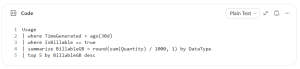
Then ask two questions about each one.
Would anyone open it outside an investigation?
Does any detection rule, hunting query, workbook or playbook read it?
Two noes make a strong data lake candidate.
Related insights


Getting started with us couldn’t be easier.
Just use the form or call us on +44 (0) 1223 834 333 to set up a call.